ClickFix attacks are increasingly devious, dangerous, and can hack you in an instant
A raft of devious malware campaigns that trick unsuspecting victims into essentially hacking themselves have flooded the internet of late.
These campaigns are commonly called ClickFix attacks, named as such because victims tend to get hacked after searching the web looking for quick fixes to tech issues, but instead get duped into running malicious instructions on their computer. These attacks affect Windows, Mac, and mobile users, and are effective at skirting cybersecurity defenses and common endpoint protections.
Over the past year, ClickFix attacks have spread across the internet, become more advanced, and are showing up in more places than ever before, making these attacks a major threat facing both consumers and businesses.
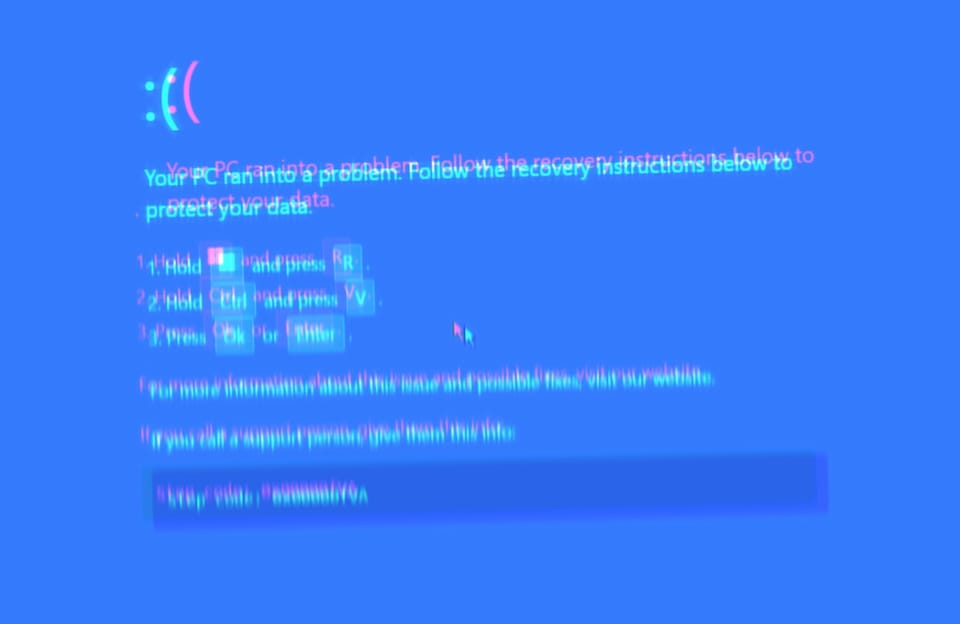
Picture this. You're browsing the web, and then out of nowhere, clicking on something like an "I am a human" CAPTCHA form appears to cause your computer to freeze. Your screen fills with an error message, saying your computer has crashed, or that your browser needs to update before you can continue. You may be prompted to hit a few key combinations on your keyboard, like opening the Run command or your computer's terminal, and the issue should resolve. All of this might seem fine on the face of it, and should only take a matter of seconds. After all, it's not like it's asking you to download and install anything… right?
But that's exactly what it's trying to get you to do. Pasting malicious code into your computer downloads and runs malware in a flash. Within seconds, the malware has already stolen some of your most sensitive information, including your saved passwords. And many victims will have absolutely no idea. For those who do, most are left with no option but to wipe their computer clean and restore their files from a backup.
![an animated GIF from the tv show 'Broad City' of a woman outside of a grocery store hunching over and screaming, with the caption "[screaming]"](https://this.weekinsecurity.com/content/images/2026/01/screaming-broad-city.gif)
Not so long ago, I saw someone's computer screen in the real-world taken over by one of these ClickFix attacks. To the untrained eye, an attack can look pretty convincing — almost like you've been hit by ransomware or some other kind of file-locking malware, with no discernible escape.
Oftentimes, though — and in the case I witnessed — this attack can be resolved simply by hitting the Escape key (or Alt + F4) on your keyboard. This usually breaks out of the full-screen window mode, revealing what was actually a spoofed web page serving a pretty convincing error message and a hacking lure.
But not everyone knows that! Instead, the stress and panic of seeing a false error like this might just be enough to tip someone into falling for it. Maybe that person had a rough day at work? Maybe their boss is being an asshole and frankly they just don't have the time and energy today for any more nonsense? Even then, some folks just don't expect to see an attack this way, or wouldn't know that this kind of attack exists to begin with.
Making matters worse, ClickFix attacks are becoming increasingly deceptive and rapidly adapt to evade detection, now lending to wave after wave of variants that use similar but different novel techniques to trick victims into running malicious code on themselves.
This is particularly problematic because anyone can get redirected to a ClickFix attack almost anywhere online, including via phishing emails, but also dodgy search results, and other regular websites that might not know they too have been hacked to unwittingly host malicious ClickFix attack code capable of ensnaring victims.
In this article, we'll dive into what you need to know about how ClickFix attacks work, why they're so dangerous for both ordinary users but also why companies and enterprises need to be aware of this, and what you can do to avoid these hacks and stay safer online.
I have also tested a few of these ClickFix attacks in-the-wild, so jump in with me and I'll show you — with screenshots and animations — what you should look out for. I really think this article is worth your time, and your subscription!